API reference
Search, read, and add to your Savepad from your own scripts, Zapier, or anything that can make a web request. Every endpoint, with an example you can copy.
Savepad has a small, boring, reliable API. It’s the same one the assistant connection uses underneath, and it’s on every plan. You don’t pay extra for it, and there’s no separate account.
If you want an assistant like Claude or ChatGPT to use your Savepad, you don’t need any of this. Follow Connect an assistant instead. This page is for when you’re writing your own thing.
Get a token
- In Savepad, go to Settings, then API and assistants.
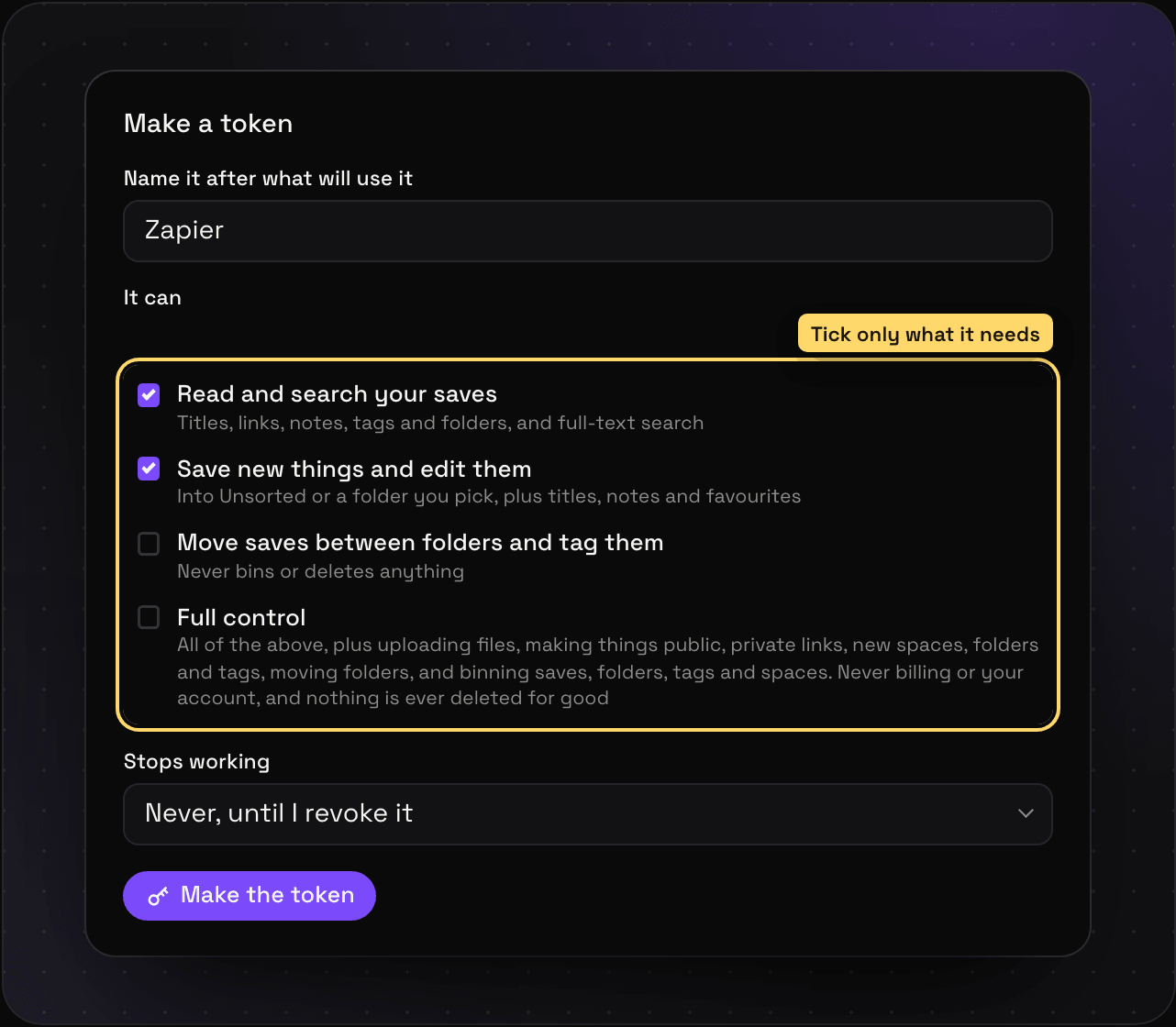
- Open For developers and fill in Make a token. Name it after what will use it (“Zapier”, “my Raycast script”).
- Tick what it’s allowed to do (see Permissions).
- Press Make the token and copy it. You only see it once.
Every request sends it as a header:
curl https://my.savepad.app/api/v1/me \
  -H "Authorization: Bearer sp_…"
The base address for everything below is https://my.savepad.app/api/v1. Requests and responses are JSON.
Permissions
| Permission | Lets a token |
|---|---|
items:read | Search and read saves, folders, and tags |
items:write | Save new links and notes, and edit titles, notes, and favourites |
organise | File saves into folders and tag them |
manage | Full control: everything above (the extra Full control actions are MCP tools for now, listed in what your assistant can do) |
A request that needs a permission the token doesn’t have gets a 403.
Who am I
GET /me tells you whose token it is and what it can do.
curl https://my.savepad.app/api/v1/me -H "Authorization: Bearer sp_…"{ "username": "anya", "name": "Anya G.", "scopes": ["items:read", "items:write"] }Search or list saves
GET /saves lists your newest saves. Add q to search titles, notes, and the full text of saved pages, PDFs, emails, and code, best match first.
| Parameter | What it does |
|---|---|
q | Words to look for |
type | Only these types, comma-separated: link, image, pdf, email, code, note, video, place, and the rest |
folder | Only this folder (and its subfolders), by id |
tag | Only saves with this tag, by id |
unsorted | true for saves that aren’t in a folder yet |
limit | How many, 1 to 100. Default 30 |
offset | Skip this many, for the next page |
curl "https://my.savepad.app/api/v1/saves?q=pricing%20toggle&type=link&limit=5" \
-H "Authorization: Bearer sp_…"{
"saves": [
{
"id": "0192…",
"type": "link",
"title": "Pricing that flips between monthly and yearly",
"url": "https://example.com/pricing",
"domain": "example.com",
"note": "The toggle animation is the whole page",
"folders": [{ "id": "0191…", "path": "Work / Landing pages / Pricing" }],
"tags": [{ "id": "0190…", "name": "pricing" }],
"favourite": false,
"saved_at": "2026-09-30T09:12:44Z",
"snippet": "monthly or <mark>pricing</mark> yearly <mark>toggle</mark>",
"app_url": "https://my.savepad.app/saves/0192…"
}
],
"total": 1,
"limit": 5,
"offset": 0
}Needs items:read.
One save
GET /saves/{id} returns a single save in the same shape.
curl https://my.savepad.app/api/v1/saves/0192… -H "Authorization: Bearer sp_…"Needs items:read. A save that isn’t yours, or is gone, is a 404.
Save something
POST /saves saves a link (send url) or a note (send text). It goes into Unsorted unless you give a folderId.
curl https://my.savepad.app/api/v1/saves \
  -H "Authorization: Bearer sp_…" \
  -H "Content-Type: application/json" \
-d '{ "url": "https://example.com/launch", "note": "Love the countdown", "folderId": "0191…" }'| Field | What it does |
|---|---|
url | The link to save. Or send text instead, for a note |
title | Optional. Otherwise Savepad uses the page’s own |
note | Optional. Why you saved it |
folderId | Optional. Which folder it goes in |
tagIds | Optional. Tags to add, by id |
You get 201 with the new save. Saving a link you already have gives 200 with the existing save and "duplicate": true, so running the same script twice doesn’t make doubles. Over your plan’s limit is a 402.
Needs items:write.
Edit a save
PATCH /saves/{id} changes a save. Send only what you’re changing.
curl -X PATCH https://my.savepad.app/api/v1/saves/0192… \
  -H "Authorization: Bearer sp_…" \
  -H "Content-Type: application/json" \
-d '{ "favourite": true, "addTagIds": ["0190…"] }'| Field | Needs |
|---|---|
title, note, favourite | items:write |
addFolderIds, removeFolderIds, addTagIds, removeTagIds | organise |
Nothing here deletes anything.
Spaces, folders, and tags
GET /folders lists your spaces and folders, with each folder’s full path. GET /tags lists your tags. Use the ids from these in the calls above.
curl https://my.savepad.app/api/v1/folders -H "Authorization: Bearer sp_…"Both need items:read.
Limits and errors
Each token gets 120 requests a minute. Go over and you get a 429, so wait a minute and carry on.
Errors always look like this, with a sentence a person can read:
{ "error": "That token can't do this. It needs the organise permission." }| Code | What happened |
|---|---|
400 | Something in the request is missing or malformed |
401 | No token, or it was revoked or expired |
402 | Over your plan’s limit |
403 | The token is missing a permission |
404 | Not yours, or gone |
429 | Too many requests, wait a minute |
For machines
If you’re plugging Savepad into a tool that reads OpenAPI (Postman, Insomnia, code generators, or an assistant), point it at the machine-readable version of this page: https://my.savepad.app/api/v1/openapi.json. There’s also an Agent skill that teaches assistants how to use Savepad well.