Connect an assistant (MCP)
Use your Savepad from Claude, ChatGPT, Claude Code, Cursor, VS Code, and more. Step by step, one link, no setup you need to understand.
Savepad has no AI inside it, on purpose. But if you already use an assistant, you can let it into your library and ask it things like “what did I save about pricing pages?” or “save this to my Paid social folder”. It works on every plan, and Savepad never calls a model itself. Your assistant does the thinking, Savepad just answers it.
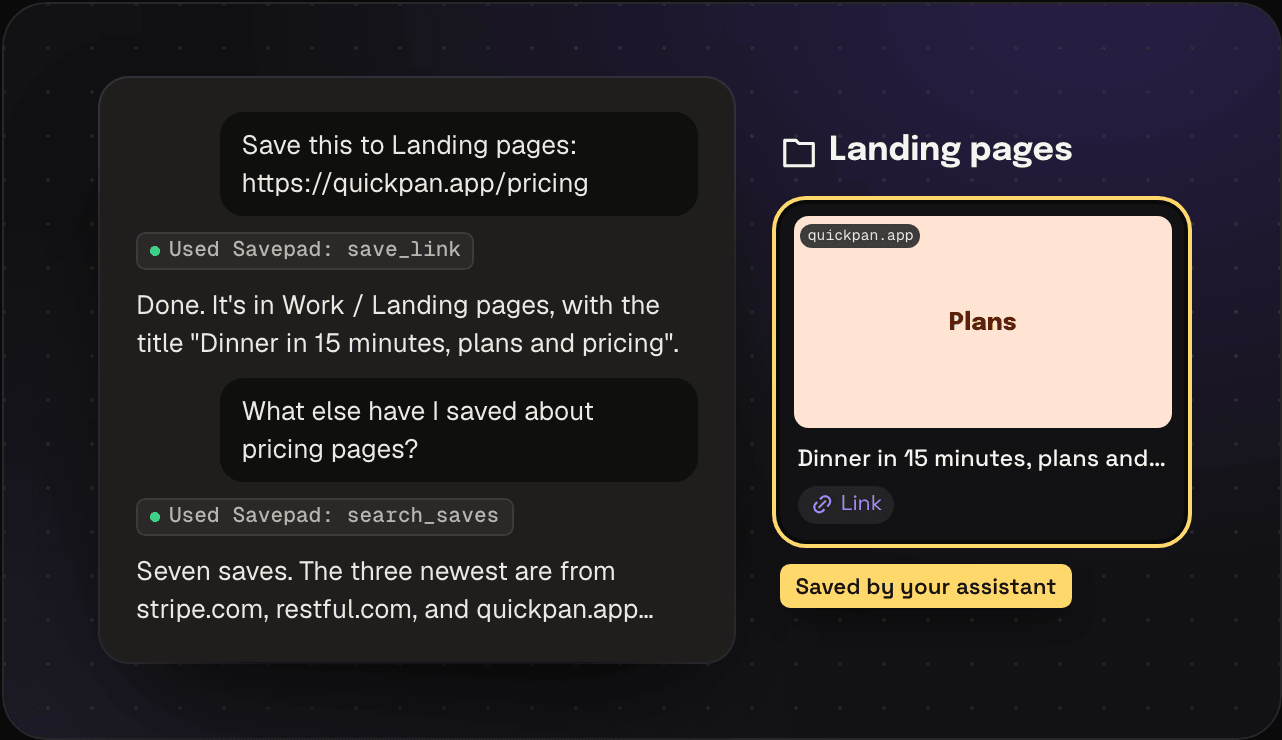
Every setup below starts the same way: you make a link in Savepad, and you paste it into your assistant. That’s genuinely it.
First, make your link
- Open Savepad and go to Settings, then API and assistants.
- Under Use Savepad in Claude or ChatGPT, pick your assistant.
- Want it to upload files, make folders, make things public, and bin stuff too? Tick Full control. Otherwise leave it, and it can search, save, and file things into folders.
- Press Make my link, then Copy.
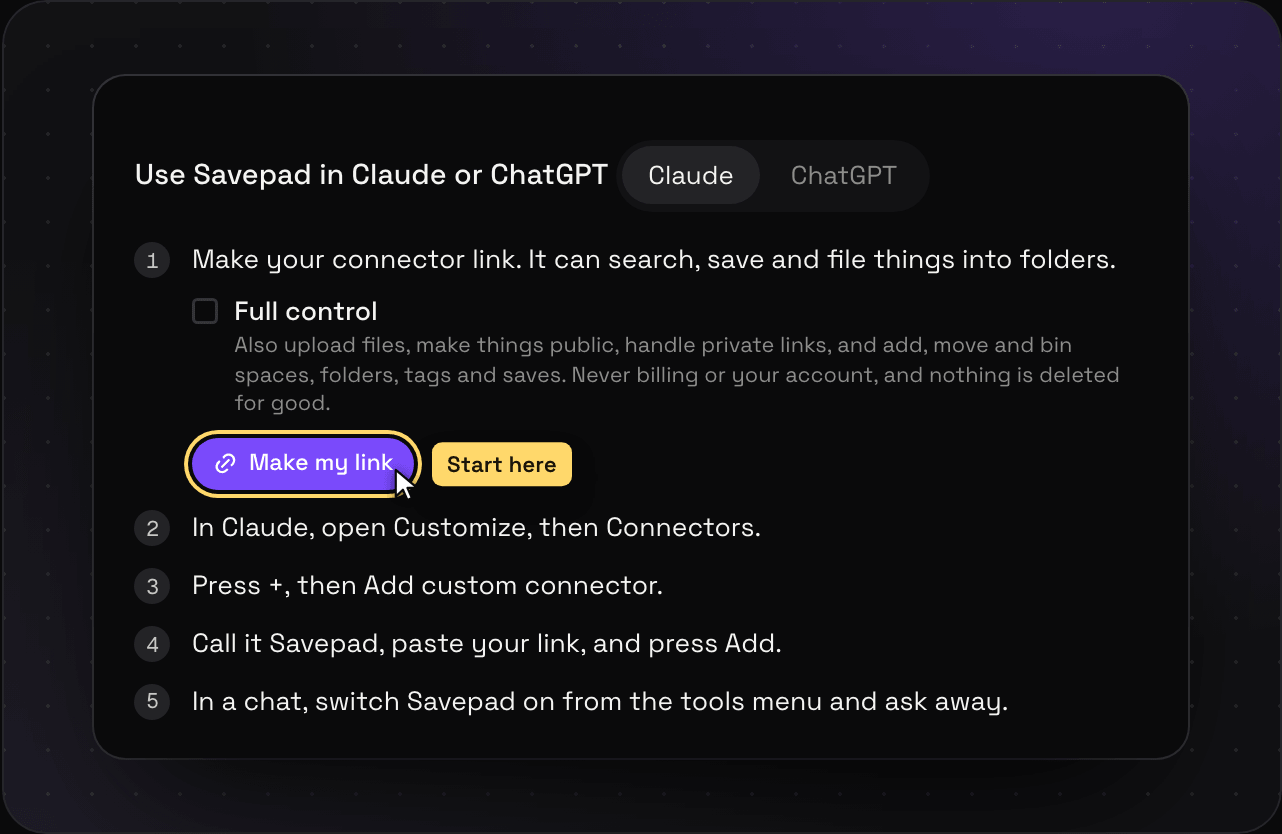
You only see the link once, so paste it straight into your assistant. If you lose it, make a new one. Lost links don’t break anything, they just sit there until you revoke them.
Claude on the web
- Go to claude.ai/customize/connectors. (Or click your name in the bottom left, then Customize, then Connectors.)
- Press the + button, then Add custom connector.
- In Name, type
Savepad. - In URL, paste your link.
- Ignore Advanced settings. Press Add.
- Start a new chat. Press the tools button under the message box (it looks like two sliders) and make sure Savepad is switched on.
- Ask it something: “What have I saved about onboarding emails?”
The first time Claude uses Savepad in a chat, it asks if that’s OK. Press Allow always if you don’t want to be asked every time.
Claude on your desktop or phone
Nothing to do. Connectors you add on claude.ai show up in the Claude desktop app and the Claude app on your phone by themselves. Open a chat, switch Savepad on from the tools button, and go.
One thing to know: free Claude accounts get one custom connector. Paid plans get as many as you like. On a Team or Enterprise plan, an owner might need to allow custom connectors first.
ChatGPT
ChatGPT calls this Developer mode, and it needs Plus, Pro, Business, or Enterprise. OpenAI renames these menus every few months (Connectors, then Apps, then Plugins), so if a label below doesn’t match, look for the nearest thing.
- Open chatgpt.com and click your name in the bottom left, then Settings.
- Go to Apps (or Connectors), then Advanced settings, and switch on Developer mode.
- Back on the Apps page, press Create.
- In Name, type
Savepad. - In MCP Server URL, paste your link.
- In Authentication, pick No authentication. The link itself is the key, so ChatGPT doesn’t need anything else.
- Tick I trust this application and press Create.
- Start a new chat, press + next to the message box, then More, and pick Savepad.
- Ask it something: “Save this link to my Inspiration folder: https://example.com”
Claude Code
Open a terminal and run this, with your link in place of YOUR-LINK:
claude mcp add --transport http savepad YOUR-LINKThen start Claude Code with claude and type /mcp to check Savepad is connected. Add --scope user before savepad if you want it in every project, not just this folder.
Cursor
- Open Cursor, then Cursor Settings (⌘ + Shift + J), then MCP & Integrations (or Tools & MCP).
- Press New MCP Server. Cursor opens a file called
mcp.json. - Paste this in, with your link in place of
YOUR-LINK, and save the file:
{
  "mcpServers": {
    "savepad": {
      "url": "YOUR-LINK"
    }
  }
}- Back in the settings, Savepad shows up with a green dot. If the file already had other servers in it, add the
savepadpart next to them, insidemcpServers.
VS Code (Copilot)
- Open the Command Palette (⌘ + Shift + P) and run MCP: Add Server.
- Pick HTTP, paste your link, and call it
savepad. - Pick Global to have it everywhere.
- Open Copilot Chat, switch to Agent mode, and Savepad’s tools show up under the tools button.
Windsurf
- Open Windsurf Settings, then Cascade, then MCP Servers, then View raw config.
- Paste this in, with your link in place of
YOUR-LINK, and save:
{
  "mcpServers": {
    "savepad": {
      "serverUrl": "YOUR-LINK"
    }
  }
}- Press Refresh in the MCP panel.
Gemini CLI
Open ~/.gemini/settings.json and add:
{
  "mcpServers": {
    "savepad": {
      "httpUrl": "YOUR-LINK"
    }
  }
}
Then run gemini and type /mcp to check it’s there.
Anything else
If your tool can connect to an MCP server over HTTP (some call it “Streamable HTTP” or “remote”), give it your link and you’re done.
Rather keep the key out of the address? Make a token under For developers in the same Settings page, use https://my.savepad.app/api/mcp as the address, and send the token as a header:
claude mcp add --transport http savepad https://my.savepad.app/api/mcp \
  --header "Authorization: Bearer sp_…"
What it can do
A link can read, save, and file things into folders, unless you tick Full control. A token gets exactly what you tick when you make it.
With Full control it can also upload files, make spaces, folders, and tags, move folders around, make things public, handle your private links, and bin things (and put them back). It can never touch your account or your billing, and it can’t delete anything for good. Binned stuff waits in the bin for 30 days, same as when you bin it yourself.
Every action at every permission, with a prompt to try for each, is in what your assistant can do. That page also lists what only you can do in the app.
Ask it things
- “Save this link to my Paid social folder”
- “Find every onboarding flow I saved this year”
- “What did I save from stripe.com? Tag it all #pricing”
- “Make my Madrid folder public and give me the link” (Full control)
- “Bin those three, I don’t need them any more” (Full control)
Hand it a pile
This is the fastest way to bring in stuff that doesn’t live in another app. Copy the whole mess, paste it into the chat, and say what you want:
- “Save every link in this Slack thread. Pricing pages go in Pricing pages, onboarding in Onboarding, anything else in Unsorted.”
- “Here’s my ‘stuff to read’ note. Save the links, and put whatever’s after each link in its note.”
- “Go through my Unsorted, tag everything by what it is, and move the landing pages into Landing pages.”
- “Make a folder for each competitor in this list and save their homepages into them.” (Full control, since it makes folders)
It works through the list one save at a time, so a few hundred links take a few minutes. Check the result in Savepad after, and import a file instead when the links are already in Raindrop, Pocket, or your browser.
Let an agent do it
Anything that can run an assistant on a schedule can use the same link. For example:
- Every Friday, save the links from the newsletters in my inbox into Reading.
- Whenever I star a repo on GitHub, save it to Dev tools.
- When I finish a research doc, save every source it cites into a folder named after the doc.
Your agent needs the link (or a token) and access to wherever the links come from. Savepad only sees the saves.
More prompts and ideas: saving links with Claude, saving links with ChatGPT, and organizing bookmarks with AI.
Keep the link safe
The link has your key inside it, so treat it like a password. Don’t paste it into a doc, a screenshot, or a group chat. Anyone with it can use your Savepad, with whatever permission you gave it, until you cut it off.
Cut it off
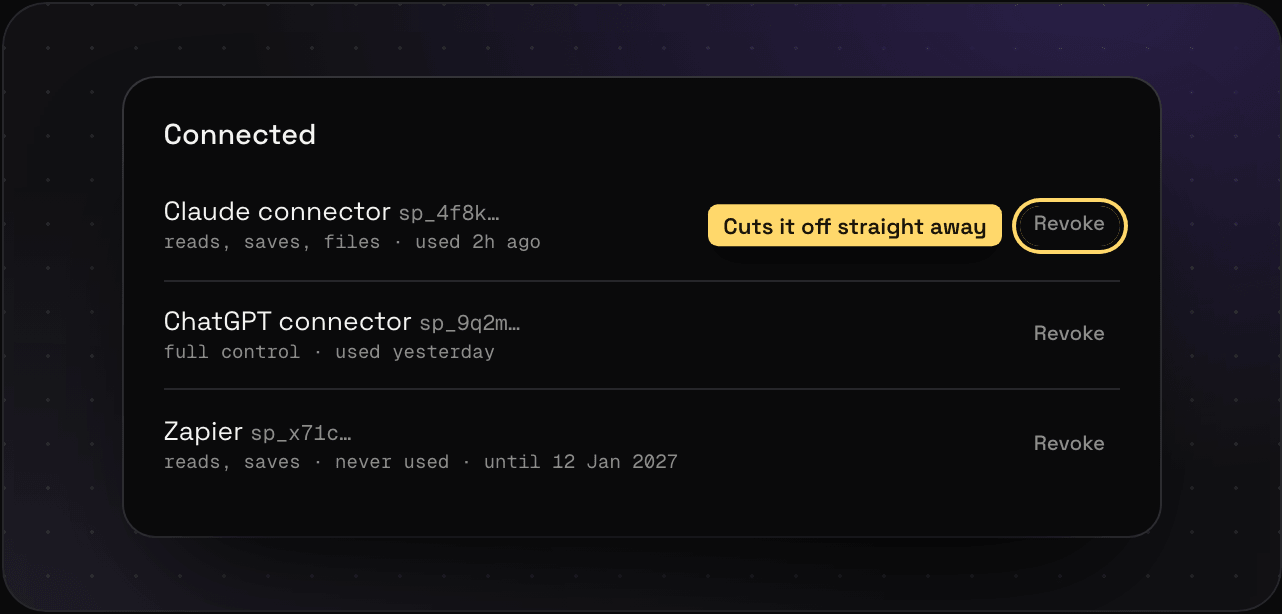
Every link and token is listed under Connected in Settings > API and assistants. Press Revoke and that assistant loses access straight away. Tokens can also expire on their own if you set a date when you make them.
Something’s not working
- “Couldn’t connect” or a 401 error. The link was revoked, or a bit of it didn’t get copied. Make a fresh one.
- Claude says it can’t reach the server. Make sure you pasted the whole link, starting with
https://my.savepad.app/api/mcp/. - ChatGPT doesn’t offer Savepad in the chat. Check Developer mode is still on, and pick Savepad from +, then More.
- It can’t make something public. That needs Full control. Make a new link with it ticked, and revoke the old one. What your assistant can do says which permission each thing needs.
Want your assistant to be better at it? Add the Savepad agent skill, a short cheat sheet that teaches it how to search, save, and file properly.
Building your own thing instead? The same token works with Savepad’s API. Every endpoint is in the API reference, with examples you can copy.